Loop Engineering: Design the Feedback Cycle, Not Just the Prompt
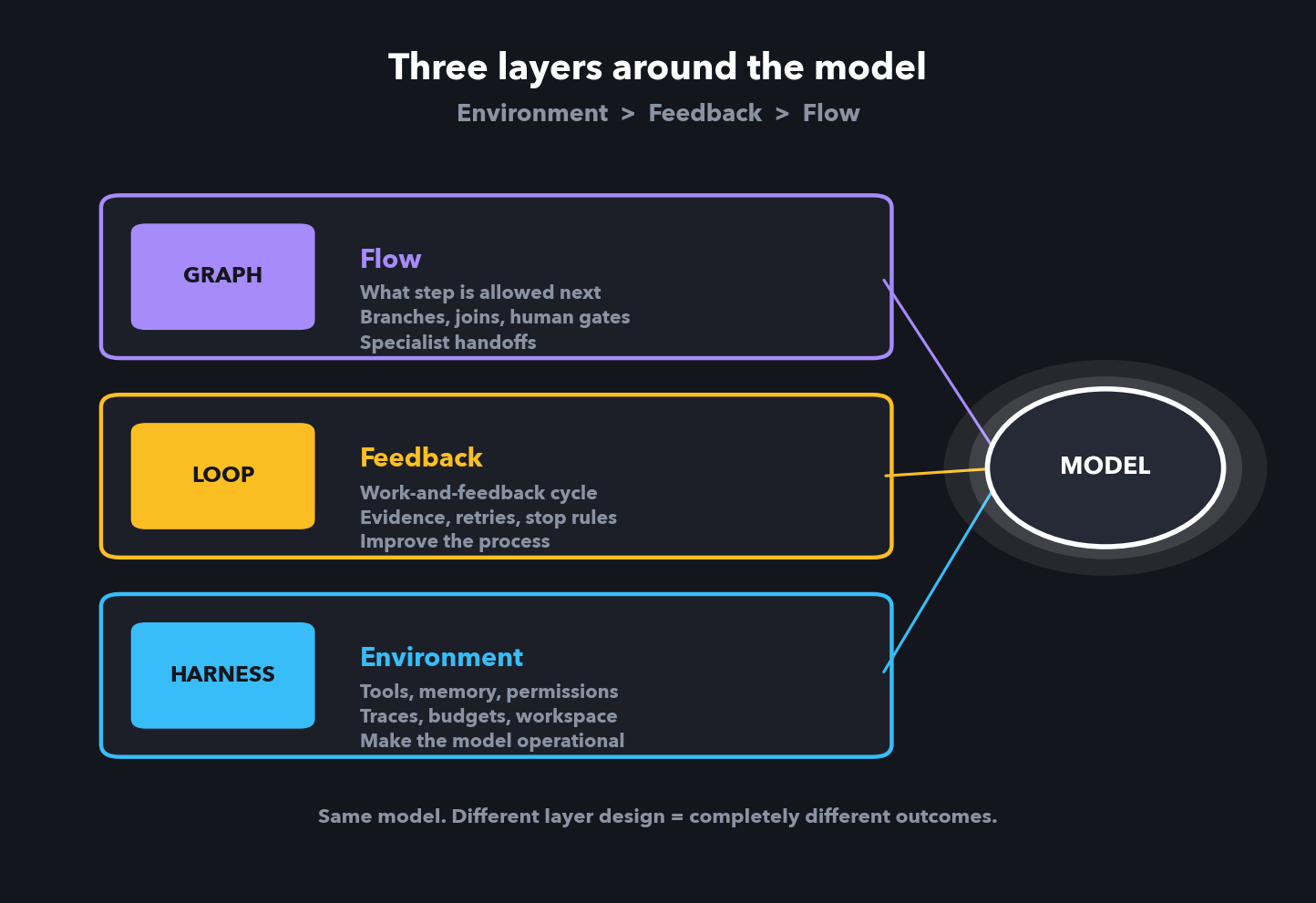
Harness, loop, and graph are not the same layer. Design the middle one so agents improve a process instead of burning tokens on “try again.”
The failure mode I keep seeing
An agent gets most of the way there. The first draft is close. The tools work. Then it either declares success while the tests are still red, or retries the same broken step until the budget is gone.
Someone blames the model. Sometimes the model is mediocre. More often, nobody designed the loop.
There is a built-in cycle in every tool-using agent: call the model, run tools, feed observations back, repeat. That is table stakes. Loop engineering starts when you intentionally design the outer cycle: what starts work, what counts as done, what evidence is required, what feedback re-enters the next turn, and when the system must stop or escalate.
This post is a tutorial on that middle layer. To use it well you also need to stop mixing it with two neighbors: the harness (environment) and the graph (workflow topology). I first saw that three-way split cleanly laid out by LunarResearcher. The framing stuck because it matches how production agents actually break.
The three layers people mix together
When an agent stops being a chat demo and starts touching files, APIs, browsers, or production systems, you are not “prompting a model.” You are building a system. Three ideas sit around that model, and all of them can contain loops:
| Layer | What you are designing | One-liner |
|---|---|---|
| Harness engineering | Environment around the model | Tools, memory, permissions, traces, budgets |
| Loop engineering | Work-and-feedback cycle | Retry, check, improve until evidence |
| Graph engineering | Workflow topology | What step is allowed next, branches, human gates |
Mental model: Environment > Feedback > Flow.
- The harness gives the model operating conditions.
- The loop makes work repeatable and verifiable.
- The graph makes complex paths explicit and controllable.
If you mix them up, you debug the wrong layer. A perfect graph will not save a junk-drawer harness. A strong harness still wastes money without good loops. Clean loops become unmanageable when branching and approvals hide in ad hoc code.
Diagnose before you pick the fix
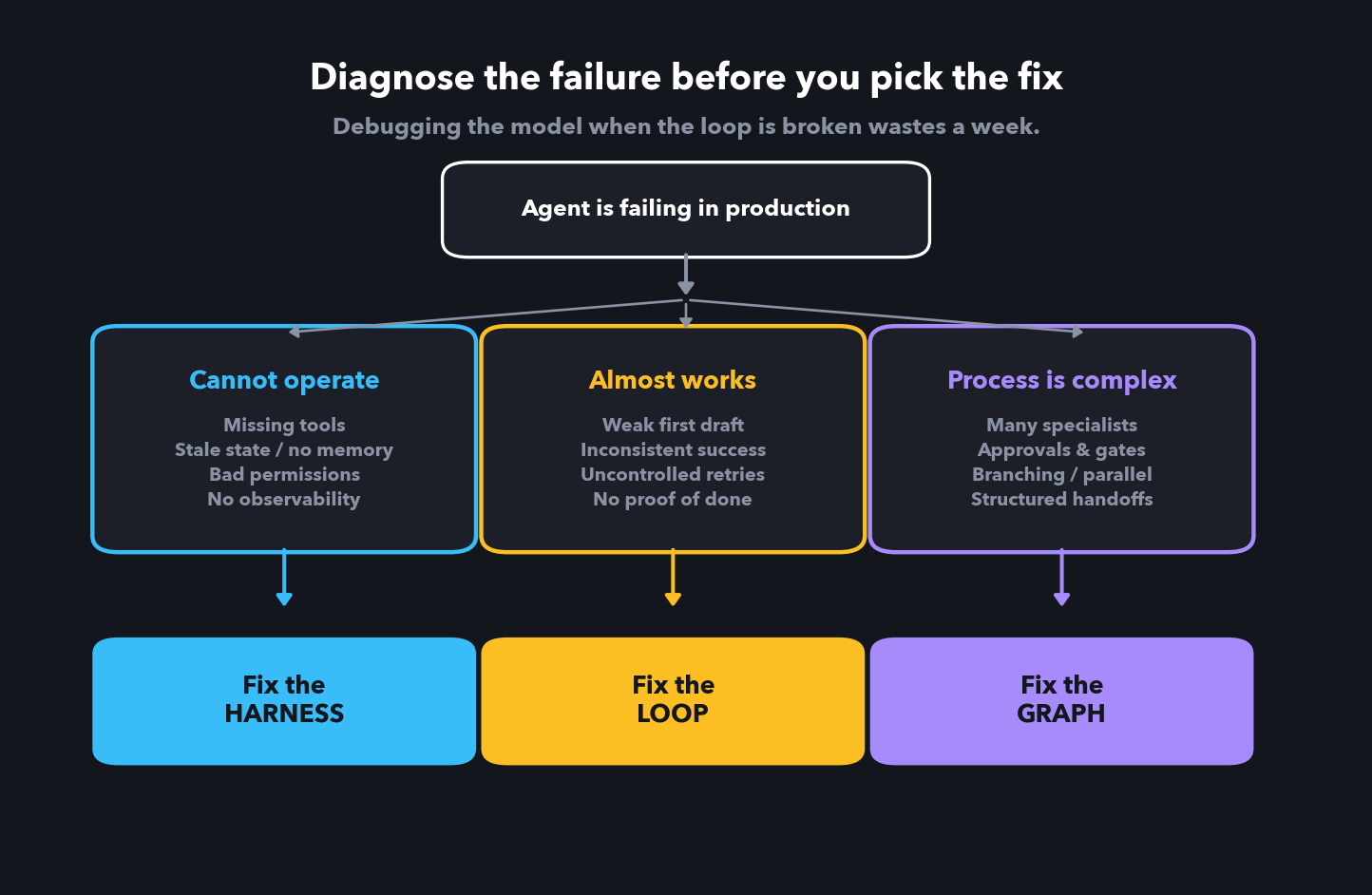
| If you see… | Fix this layer |
|---|---|
| Missing tools, stale state, no memory, bad permissions, no traces | Harness |
| Almost works, inconsistent success, uncontrolled retries, no proof of done | Loop |
| Many specialists, approvals, branching, parallel handoffs | Graph |
That table alone is worth the bookmark.
What loop engineering is (and is not)
Prompt vs loop
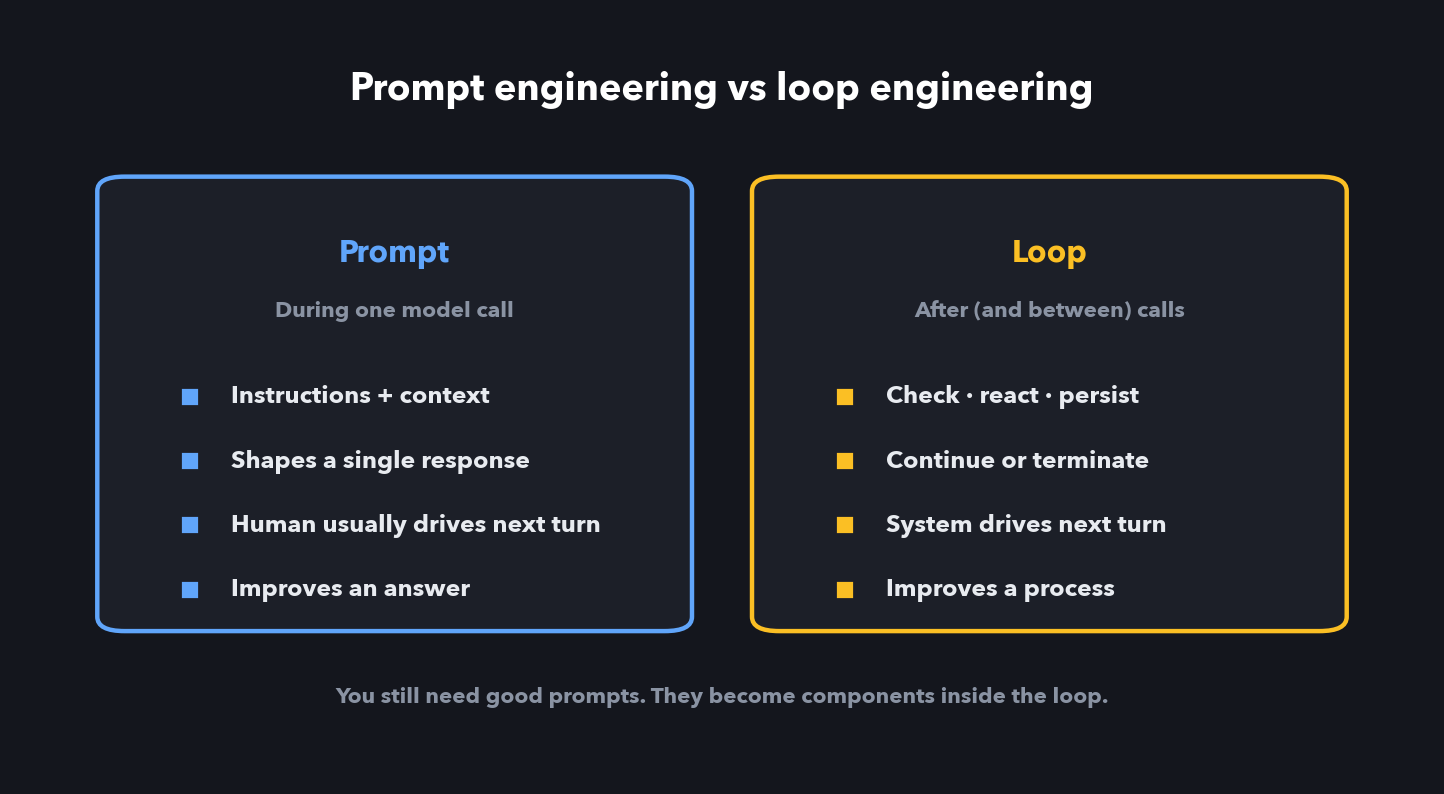
A prompt shapes one model call. A loop defines what the system does after (and between) calls: check results, react to failure, persist progress, continue, or terminate.
Prompting improves a response. A loop improves a process. Different engineering problem. You still need good prompts. They become components inside the loop.
The built-in loop is not enough
Every agent that uses tools already does something like:
while not finished:
  response = model(context)
  if tool_calls:
    results = run(tool_calls)
  context += results
Loop engineering is not inventing that. It is adding intent around it: a real goal, durable state between cycles, evidence of success, actionable failure feedback, and stop rules that are not “the model feels done.”
Not these things
- Not bare retry.
for i in range(5): try againwithout new evidence is a cost leak. - Not “keep improving.” Vague goals never terminate cleanly.
- Not confidence. “I believe the bug is fixed” is not a stop condition.
Cultural context (not hype)
In 2026 the industry language shifted from “write a better prompt” to “design the system that prompts the agent.” That line shows up in Addy Osmani’s write-up of loop engineering and in public comments from people building coding-agent products. The useful part is not the slogans. It is the primitives that shipped around them: schedules, run-until-condition goals, worktrees, skills, MCP connectors, subagents, and external state.
You can build loops with bash and a queue. You can build them inside Claude Code or Codex. The design questions are the same.
Anatomy of a good loop
Seven pieces. If any of them is missing, the loop will either thrash or lie about success.
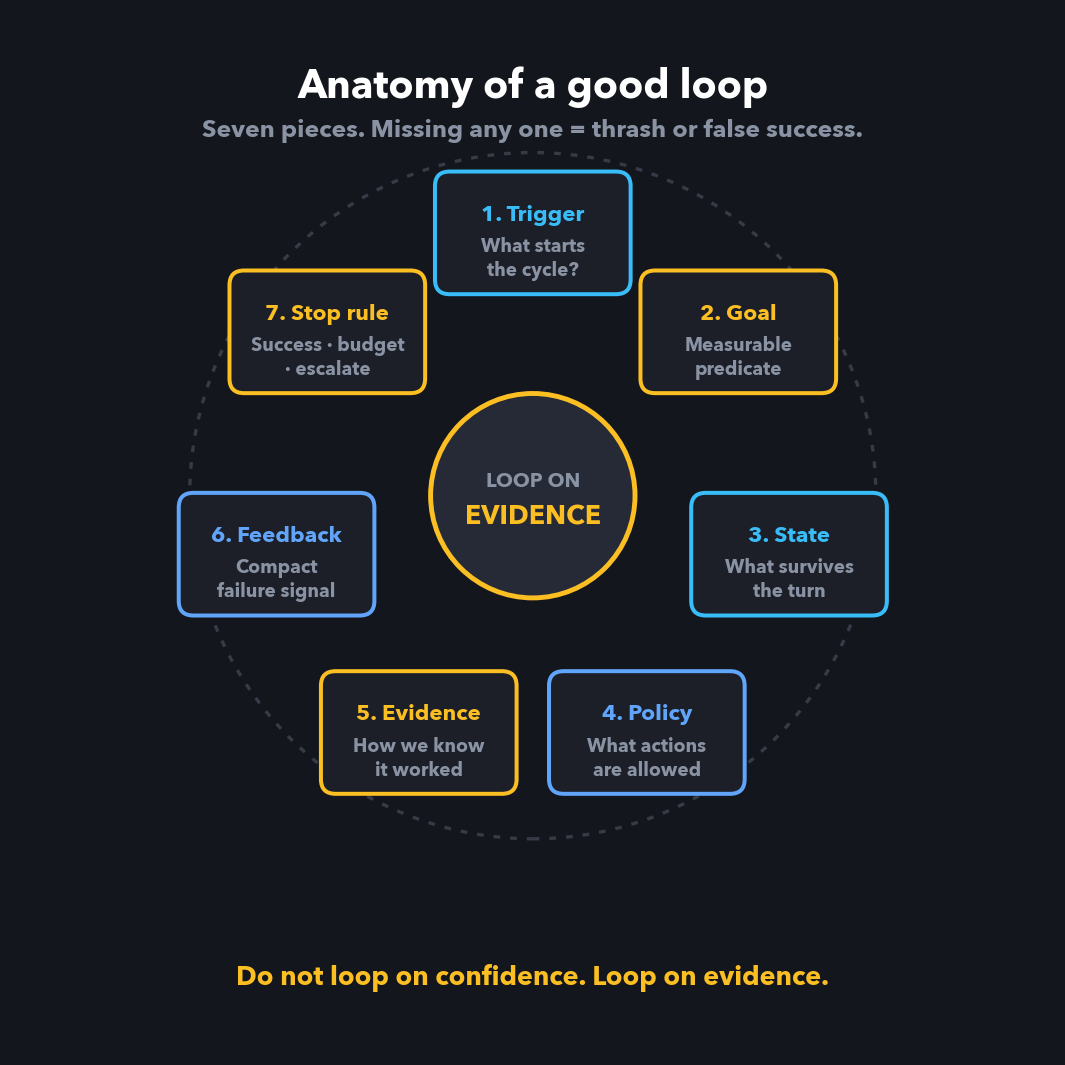
1. Trigger
What starts a cycle?
Examples: user request, failed CI, new document in a folder, cron schedule, webhook, evaluator score below threshold.
Be explicit. “Whenever I remember to open the agent” is not a production trigger.
2. Goal
What specific condition are we trying to reach?
Bad: “Improve the code.”
Good: “All unit tests under test/auth pass and lint is clean.”
The goal is a predicate, not a vibe. If you cannot write a check for it, you cannot loop on it.
3. State
What does the next cycle need to know that the model will forget?
Current draft, previous attempt summary, tool results, error log, progress checklist, which files were already tried.
State lives outside the context window: files, git, a small DB, a ticket. The model forgets between runs. The repo does not.
4. Action policy
What is the agent allowed to do inside the loop?
Edit files, spawn a subagent, call tools, spend tokens, open a PR, push to a branch. Also: what it is not allowed to do (force-push main, production deploy without approval, unbounded web scrape).
Policy is harness-adjacent (permissions live in the harness) but the loop chooses when to exercise which permission.
5. Evidence
How do we know whether it worked?
Tests, schema validation, citation resolve, metrics, diff against a baseline, human reviewer, policy scanner.
Evidence should be as deterministic as the domain allows. Prefer a test runner exit code over “another model says looks good.” Self-review can help, but it shares blind spots with the writer. Separate reviewer context, external evals, or a human gate for high-impact actions.
6. Feedback
What exactly failed, in a form the next turn can use?
Not a 40k-token log dump. Compact, actionable: failed test names, assertion messages, schema path that broke, missing citation URLs. The quality of the feedback is often the quality of the next iteration.
7. Stop rule
When does it end?
- Success (evidence predicate true)
- Timeout
- Budget exhausted (tokens, dollars, wall clock)
- Max retries hit
- Irrecoverable failure class
- Escalate to a human
Most important principle (still the best one-liner in this space, from LunarResearcher):
Do not loop on confidence. Loop on evidence.
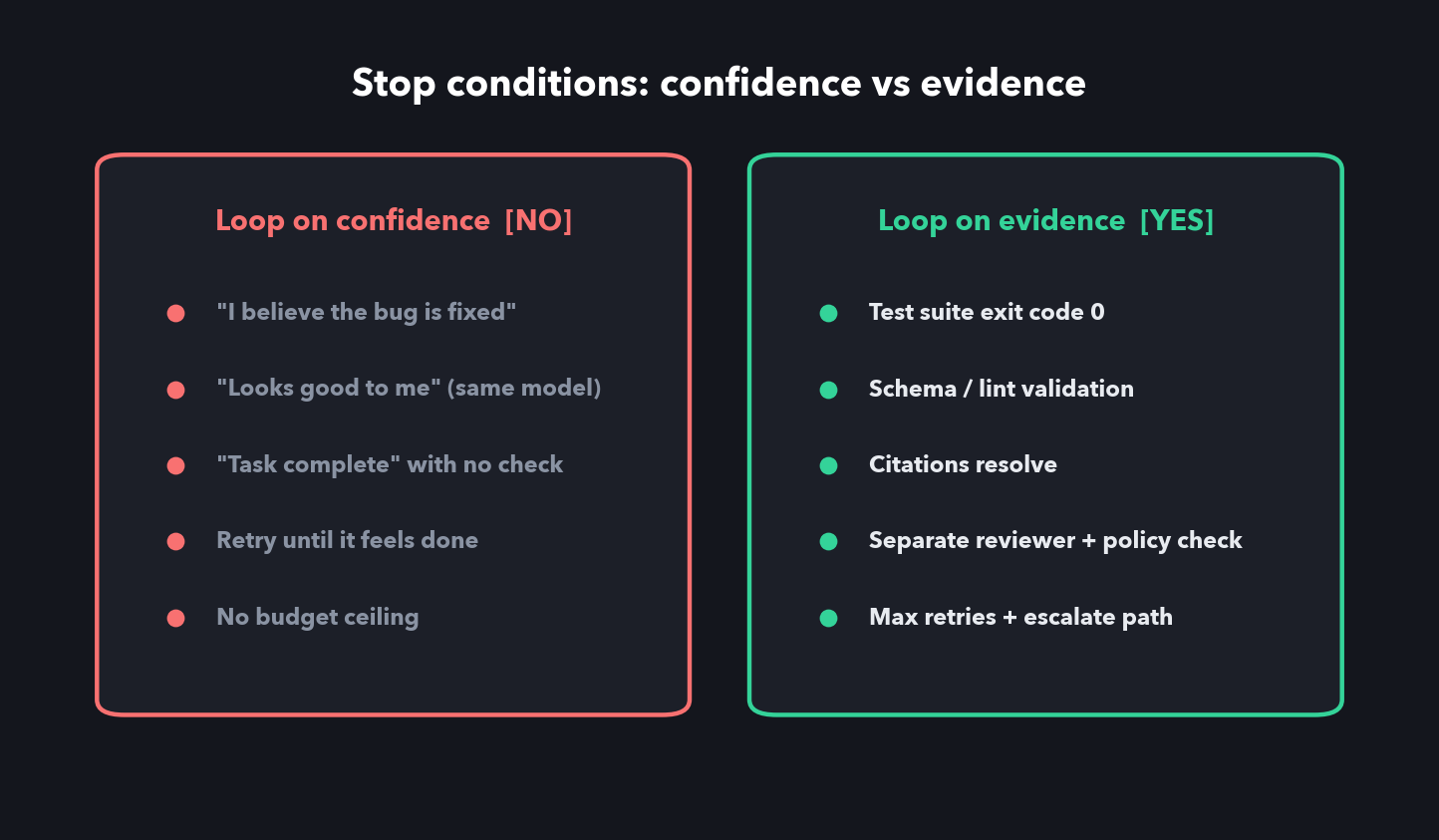
“The agent says it is done” is not a stop condition.
Four practical loop types
You do not need a custom architecture for every use case. Most production loops fall into four shapes:
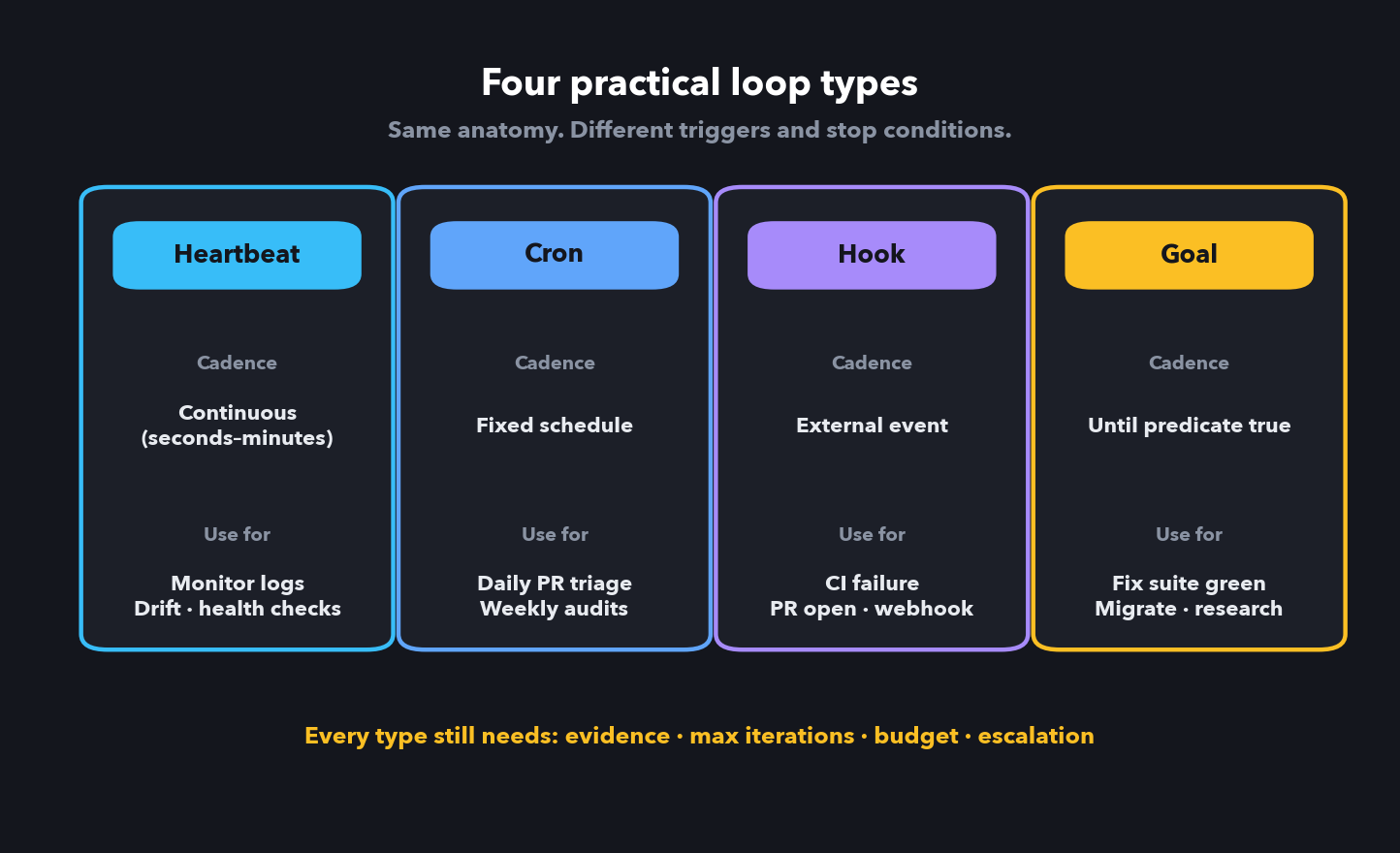
| Type | Cadence | Good for |
|---|---|---|
| Heartbeat | Seconds to minutes, continuous | Monitoring, drift, log watch |
| Cron | Fixed schedule | Daily PR triage, weekly dependency audit |
| Hook | External event | CI failure, PR open, Slack command |
| Goal | Until predicate true | Refactor, migrate, fix suite, research until citations resolve |
All four still need: goal (or watch condition), evidence, max iterations or budget, and an escalation path. A heartbeat with stop: never and no budget is how people discover their API bill.
Worked example: CI red to green
Concrete goal loop you can implement in any stack.
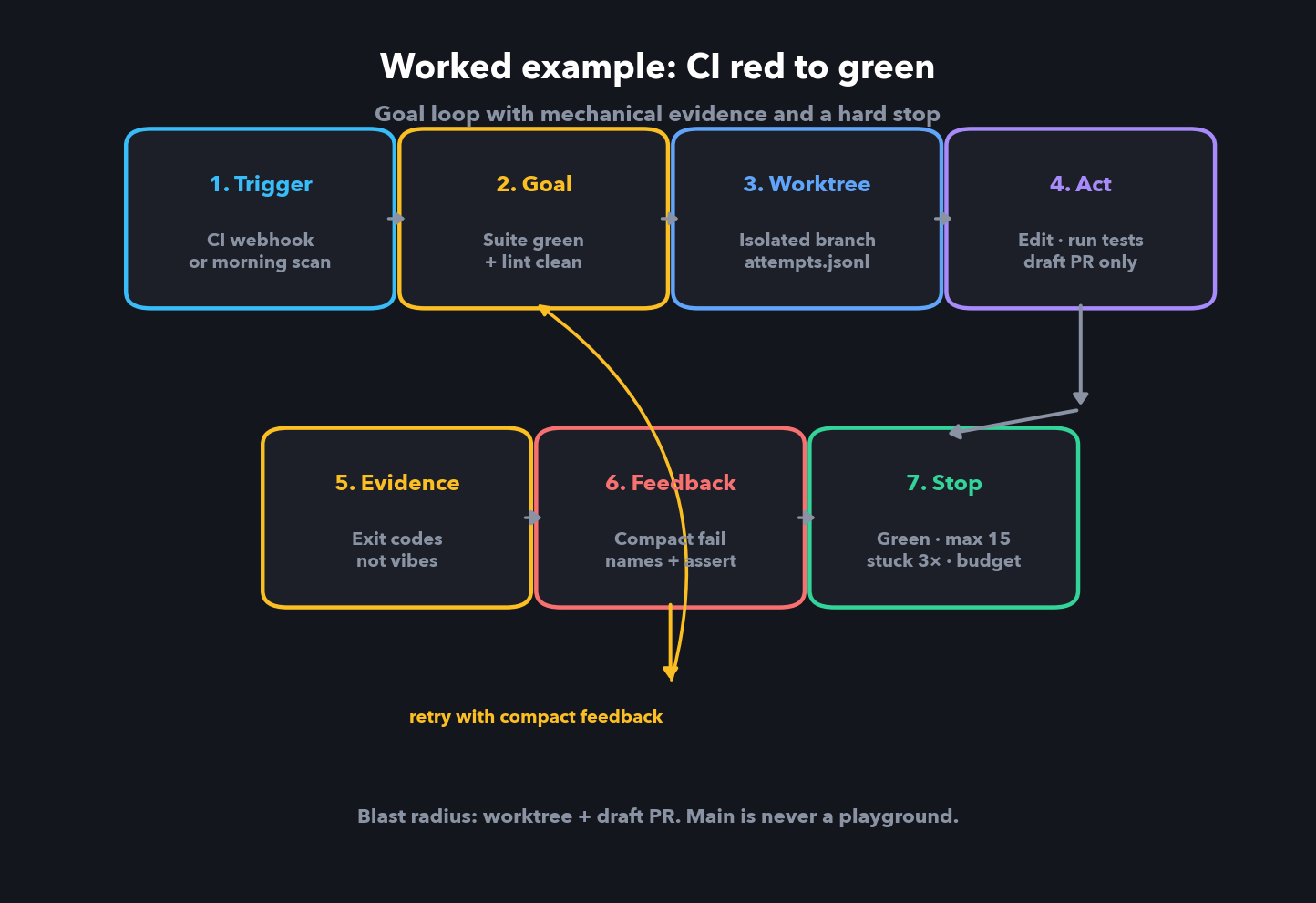
Spec
| Piece | Choice |
|---|---|
| Trigger | CI webhook on failure, or scheduled scan of open red checks |
| Goal | Target test suite green + project lint clean |
| State | Isolated git worktree, attempts.jsonl, last failure summary file |
| Action policy | Edit only inside worktree; run tests; open draft PR; never push to main |
| Evidence | Test suite exit 0; linter exit 0 |
| Feedback | Failed package + first failing test name + assertion message (truncated) |
| Stop | Green or 15 attempts or token budget or same failure 3 times in a row → escalate |
Cycle (pseudocode)
on_ci_failure(job):
  worktree = create_worktree(job.sha)
  state = load_or_init(worktree / "attempts.jsonl")

  while True:
    if state.attempts >= 15:
      escalate(worktree, reason="max_attempts"); return
    if budget_exhausted():
      escalate(worktree, reason="budget"); return

    failure = read_ci_or_local_summary(worktree)
    if same_failure_streak(state, failure) >= 3:
      escalate(worktree, reason="stuck"); return

    plan = model.propose_fix(
      goal="make suite green and lint clean",
      failure=compact(failure),
      prior=last_n(state.attempts, 3),
      policy=POLICY_DOC,
    )
    apply_edits(worktree, plan)
    result = run_tests_and_lint(worktree)
    append(state, {plan, result})

    if result.ok:
      open_draft_pr(worktree, body=summarize(state))
      return

    # next iteration gets compact failure only
    write(worktree / "last_failure.txt", compact(result))
What this gets right
- Evidence is mechanical. Exit codes, not vibes.
- State survives the model. Attempts log is the spine.
- Stuck detection. Same failure three times → human, not infinite rewrite.
- Blast radius. Worktree + draft PR; main is not a playground.
- Feedback is compact. The next prompt does not drown in noise.
What still fails without a harness
If tools are wrong, permissions are open, or you have no traces, this loop is theater. Observability (what did it try, what did tools return, how much did it cost) is harness work that makes loop debugging possible.
When a graph appears
If the real process is “triage → security review → fix → QA → release approval,” you have branching and human gates. That is graph territory. Do not encode the whole org chart on day one. Start with the CI goal loop, collect traces, then formalize the paths that keep repeating.
Harness and graph: enough to stay oriented
Harness (environment)
A serious harness usually includes:
- Context injection — instructions, retrieved knowledge, conversation state, memory, policies
- Action surfaces — APIs, browser, shell, code exec, MCP tools, databases
- Persistence — files, checkpoints, session state, progress logs, git history
- Execution control — retries, timeouts, budgets, model selection, subagents, approval gates
- Safety — least privilege, isolation, allowlists, secret handling, human approval
- Observability — traces, tool I/O, state transitions, latency, cost, evals
Two teams, same model, different harnesses: different outcomes. Rule of thumb: precise, not crowded. More tools do not mean better agents. Tool selection errors and noisy context are real.
Graph (topology)
Nodes, edges, joins, parallel work, explicit retries, human interrupts. Worth it when branching and handoffs are meaningful. Less useful when the job is “one agent, a few tools, a clear goal.” Structure too early makes the system brittle.
Common mistakes
- Graph before you have traces of real work.
- Same model writes and grades with no external check.
- “Keep trying” without goal, evidence, limits, escalation.
- Harness as a junk drawer of tools.
- Blaming the model for broken APIs, missing exits, or invisible failure modes.
Production checklist
Loop
- What evidence proves success?
- What compact feedback returns on failure?
- How many retries are allowed?
- What is the stop rule set (success, budget, max, escalate)?
- What happens when the budget runs out?
- Does state survive context reset?
Harness (minimum)
- Tools narrow and documented?
- State durable?
- Least privilege?
- Traces visible (tool I/O, cost, transitions)?
Graph (only if needed)
- Which paths must be deterministic?
- Where are human gates?
- What can run in parallel, and what must join?
Ops
- Cost per run, failure rate, intervention rate, task success in production.
Closing
People still talk about AI agents as if the breakthrough is the model. In production that is rarely the differentiator. The differentiator is the system around it: the harness that lets it work, the loops that let it improve under evidence, the graph that lets complex work stay controllable.
Loop engineering is the middle skill that most teams under-design. They either ship a single heroic prompt or they draw a huge flowchart before any run has produced a trace. The useful path is smaller: pick one recurring failure mode, define a measurable goal, wire evidence and stop rules, keep state on disk, and only then promote the stable patterns into a graph.
Do not loop on confidence. Loop on evidence.
Build the loop. Stay the engineer who designed the stop condition.
References
- LunarResearcher — A Practical Guide To The 3 Layers (primary framing: harness / loop / graph)
- Addy Osmani — Loop Engineering (primitives across coding-agent products; stay the engineer)
- Requesty — Loop Engineering (loop type taxonomy, cost pitfalls)